Normal service has been resumed...
 I had noticed that in recent days, this website had started to produce quite a few occasional '502: Bad Gateway' errors. This morning, it turned into a veritable flood, to the point where I literally could barely write anything without triggering one. I have accordingly spent a long 5+ hours trying to get things back on to an even keel, all ultimately without success. In a fit of desperation, I moved my entire website out of a Proxmox container and back onto physical hardware (albeit quite slow physical hardware!)
I trust that if you're reading this, it demonstrates that the move has achieved its goal of getting the site back online and in good order. My apologies for the outage. It does, unfortunately, mean that the raft of software updates I was planning for in the next day or two will have to be bumped back a bit (maybe a week).
Giocoso Random Music Selection Logic Bomb
 Imagine I have 100 recordings by Benjamin Britten, of all sorts of durations, from 2-minute long songs to 3-hour long operas. Imagine, too, that I have asked to select 10 recordings by Britten, that last between 20 and 40 minutes, but only the first of the 10 should actually be picked to be played for some reason.
What Giocoso used to do was take the 100 recordings and randomly “rank” them: that is, it would assign a system-generated number to each one, starting at 1 and finishing at 100. Then it would grab the recordings with the first 10 ranking numbers (i.e., items 1 to 10), since that’s what I’d asked for it to select. Finally, it would assess those 10 recordings for their duration and make sure they fit between 20 and 40 minutes.
Here, for example, is the first pass: randomly select 10 recordings by Britten and rank them:
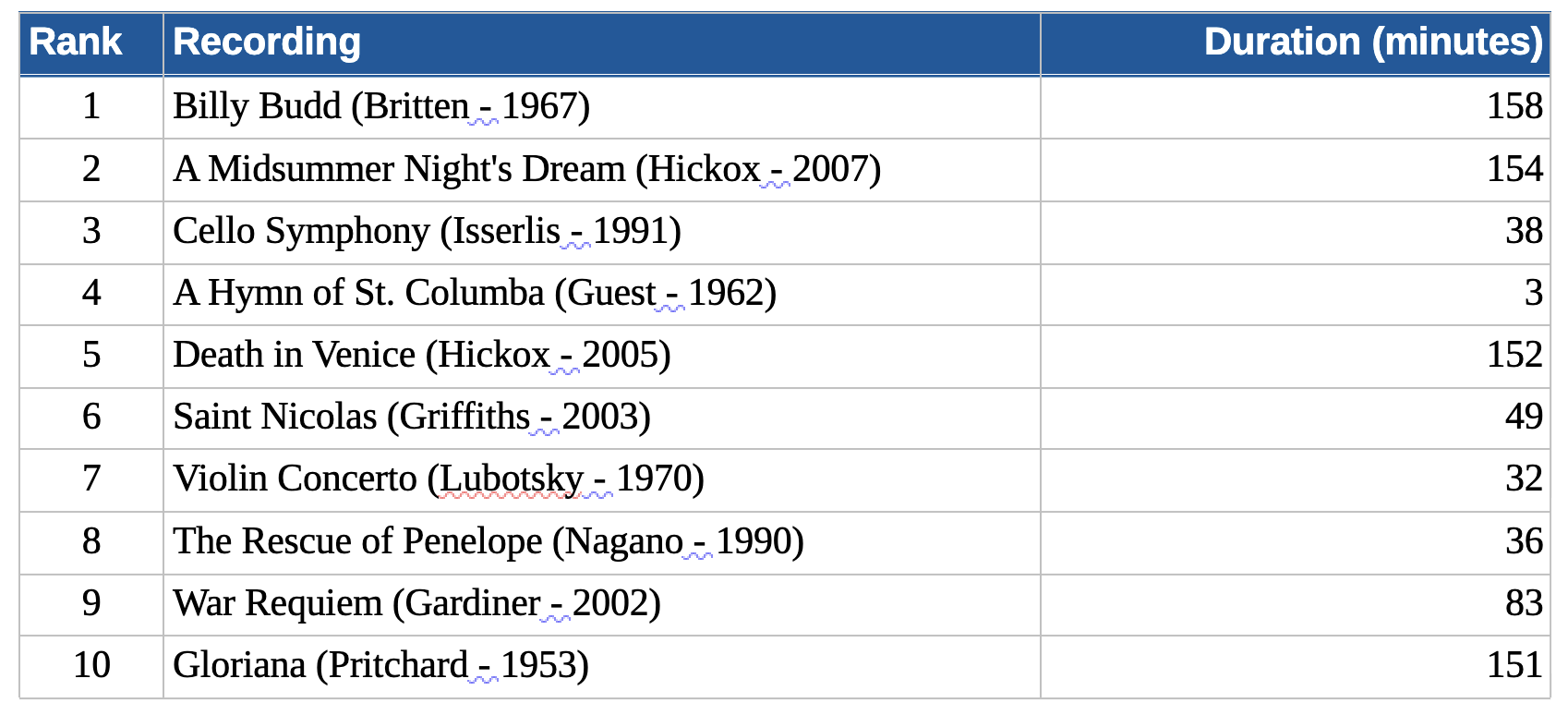
Now we apply the “between 20 and 40 minutes” filter:
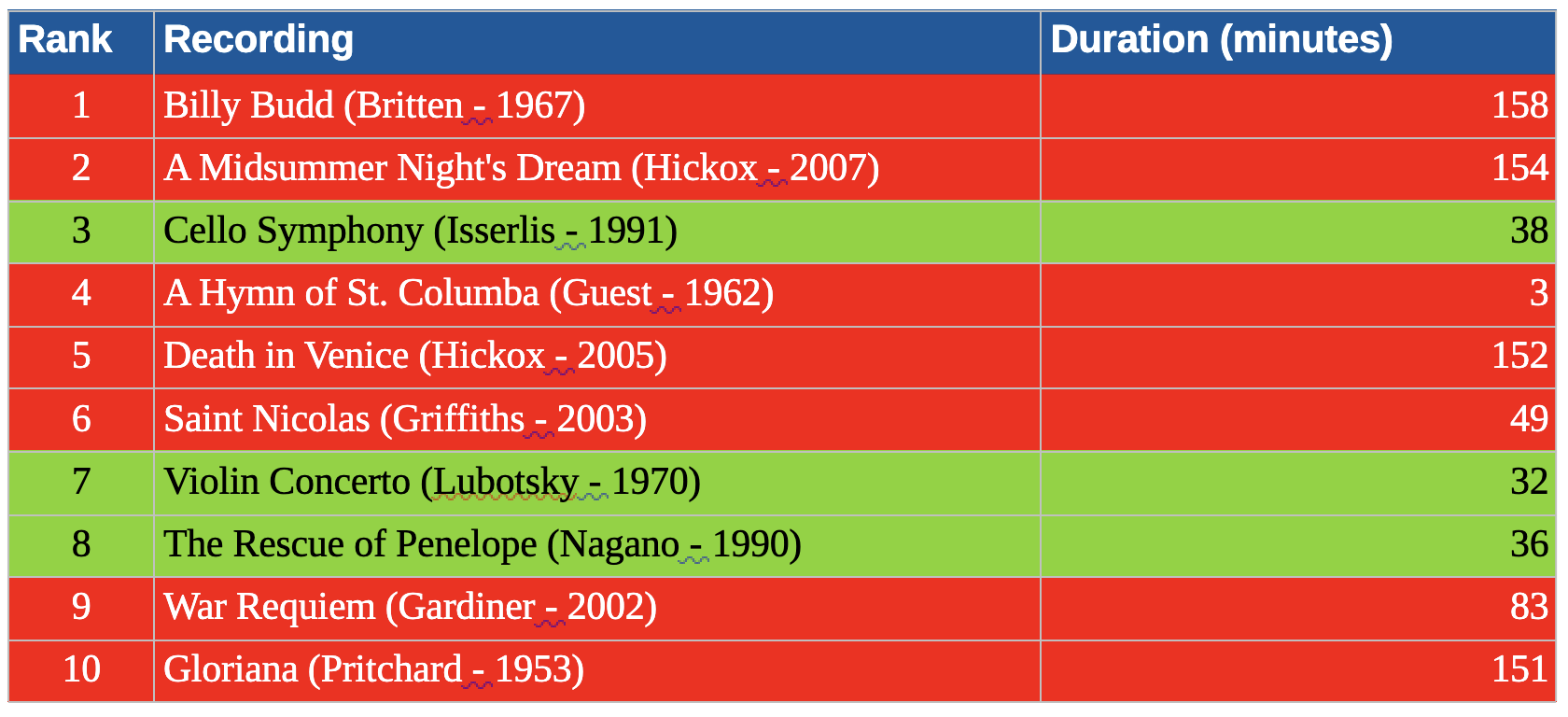
Only three recordings now match all our selection requirements.
Except there was one other requirement which makes things even worse: from the possible play candidates, play only one. The way Giocoso did that was to say “where rank = 1”… and I hope you can see that I won’t be playing anything by Benjamin Britten, because his ‘rank=1’ item is one of the forbidden recordings (forbidden by its long duration). The Cello Symphony could be played on duration grounds, but because it was already assigned a rank of ‘3’, the ‘rank=1’ selection test renders it ineligible for play.
This is how Giocoso has been selecting music for a long while now… and it’s logically flawed. It certainly “worked” with a sufficiently large music collection with sufficiently high numbers of different composers and with sufficiently lax duration requirements: but it ranked first and filtered second… and doing things that way round means that lots of eligible recordings (say, Britten’s Cello Symphony or Violin Concerto from the above example) would not get selected, because they happened to be assigned the wrong, not-1, ranking number early on.
The logically correct way of doing things is to filter first and rank second. If I had done that, I would have struck out all the red items in the last table for duration reasons and that would have left this selection of three candidate recordings:

Only now do I assign a ranking:

When I finally add in the “rank = 1” selection restriction: lo and behold, my next cycle of 10 plays will include the Cello Symphony.
By assigning rank early, I make it highly improbable I’ll find a recording to play (it is pot-luck if a duration-qualified recording might get assigned a rank of ‘1’); by assigning it late, assuming any recordings meet the duration requirement, I’m absolutely guaranteed to pick one of them when I add the ‘rank=1’ restriction.
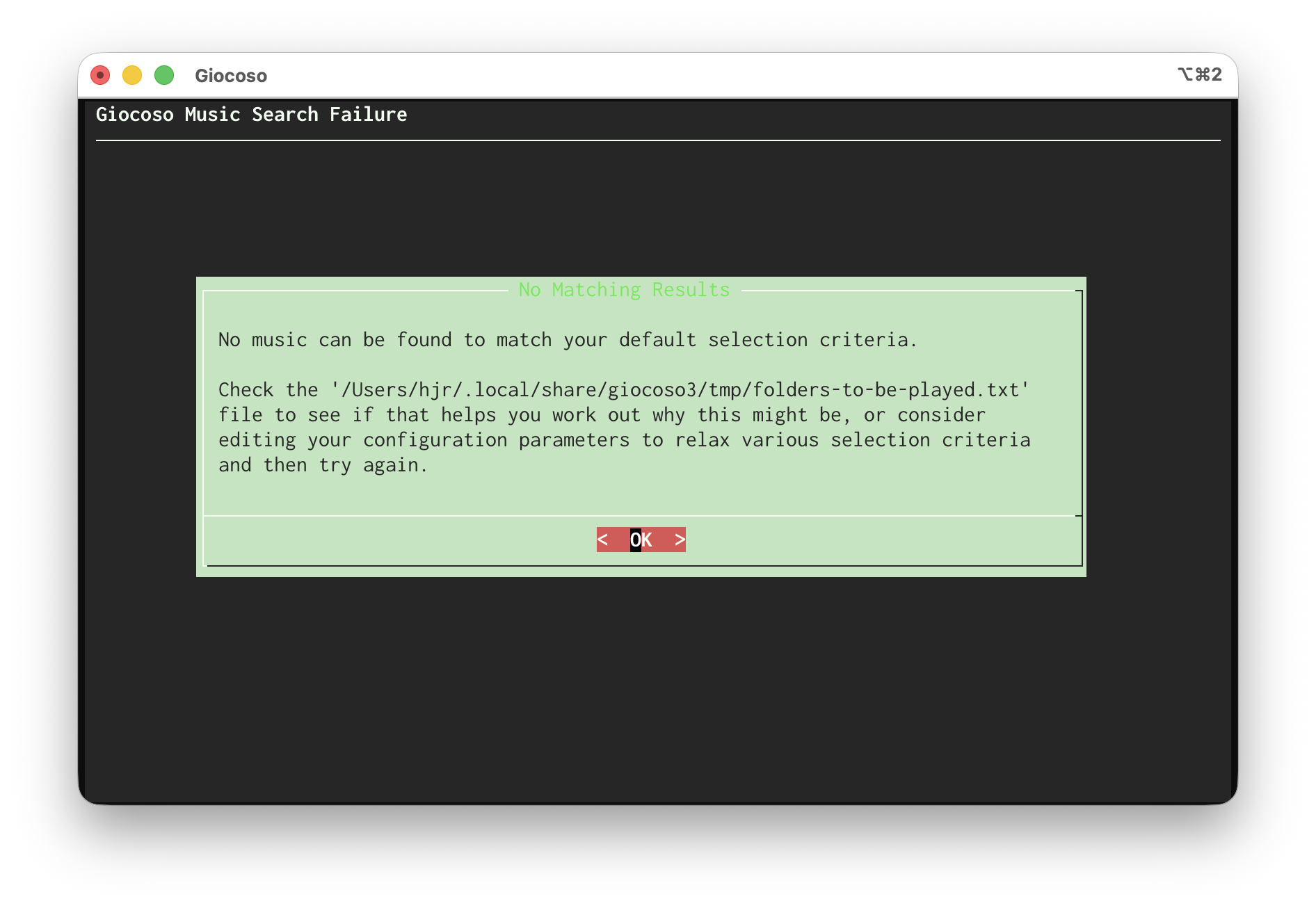
I mention this now because I’ve fixed it in the forthcoming release of Giocoso 3.37. That release (I’m tentatively aiming for the very end of March) re-orders the selection and ranking operations, with the result that it’s now much easier for recordings that qualify on duration or other configured selection criteria to make it through to being played, without being artificially disqualified on the grounds that their randomly-assigned rank number is ‘wrong’! Instead of seeing lots of this screen:
…you'll see much more of this sort of screen:
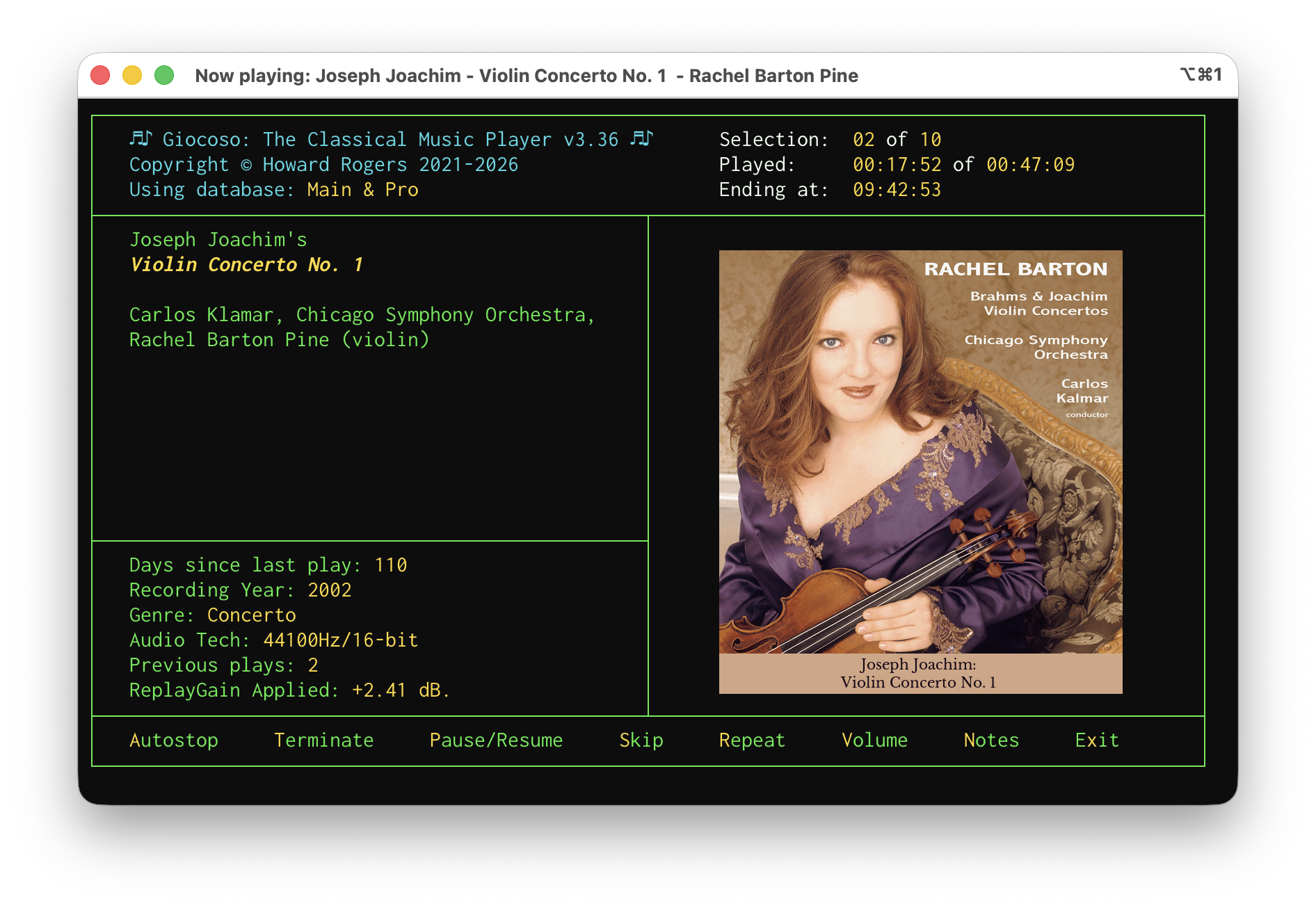
Giocoso music playback is, in short, now much more likely to play a diverse mix of works by multiple composers than before, whilst still holding fast to the ‘one composer per cycle of plays’ principle. I'm only sorry it took me this long to work out why I was having quite so many of the 'no music to play' screens before!
I’ll announce the next release here when it happens, of course: right now, I’m giving it multiple days of testing to ensure the logic is now really where I need it to be!
MacOS Woes (part #94)
 I'm two months into my 'exciting' adventure with macOS! For the most part, it's been fine, even if the windows handling is primitive and its privacy/security settings can seem a bit over-eager at times. Today, however, I got really cheesed off! The problem is a big one for fans of classical music who are forever having to tag things with ß, ä or è characters. Like me who, yesterday, finally got around to cataloguing a performance of Ernest Chausson's Poème.
The first issue is how you type foreign characters on an iMac at all: it has its own native way of doing it (for example, holding down the 'e' key will, in most situations, produce a pop-up from which you can select the appropriately-accented version), but that doesn't work in Semplice because all you get by holding down the 'e' key there is 'eeeeeeeeeee'! Anyway, I sorted this out way back in January in a way documented (roughly) here: see the section headed "Compose Key". I can now type “poème” as I would have done on any Linux machine: tap right-command, press `, press e: job done!
This morning, however, I played the piece I catalogued yesterday and saw this in Giocoso:
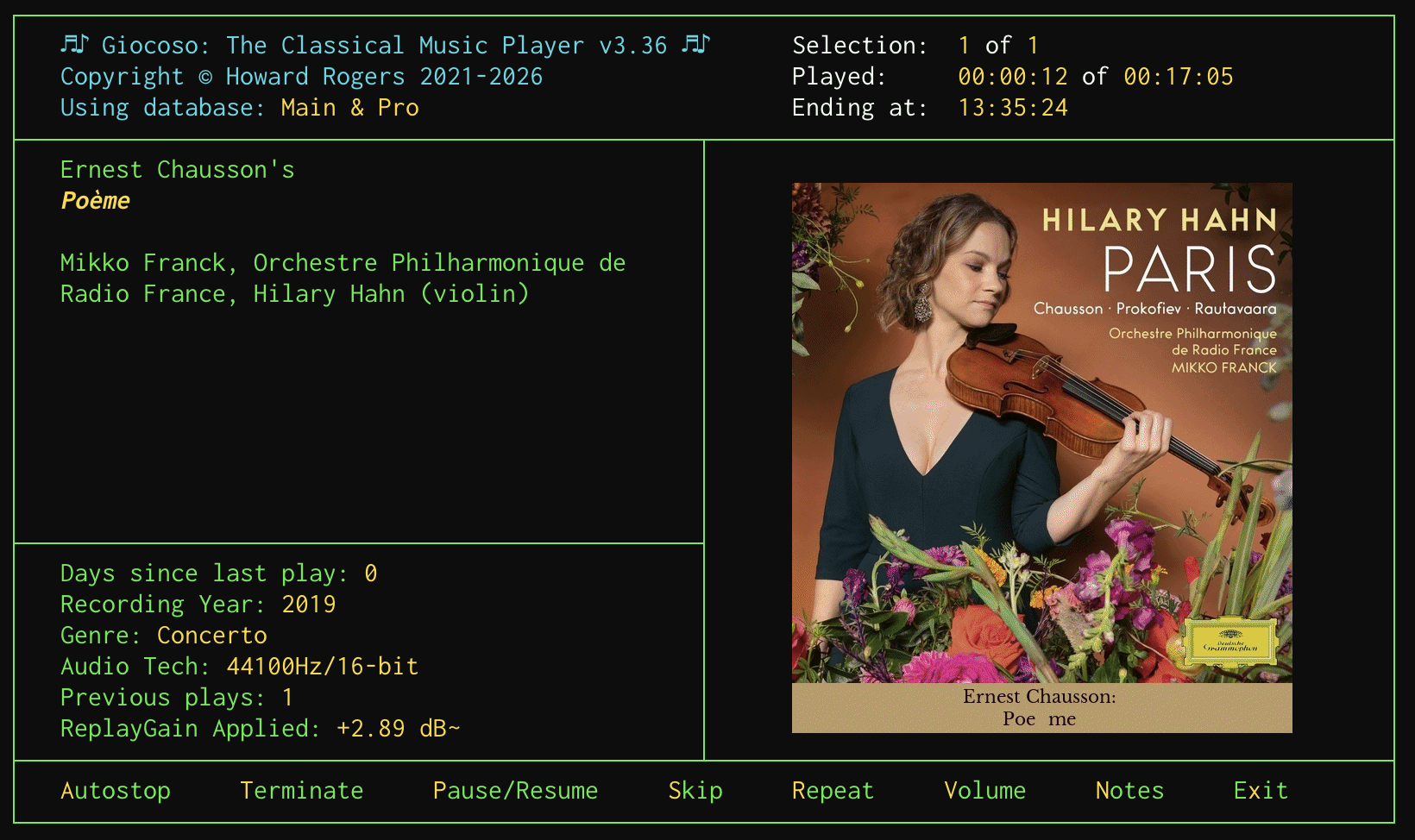
In case it's not obvious, let me zoom in on the artwork display there:

Rather than “Poème”, we have Giocoso rendering things as “Poe me”: no accent, but an extra space. But look over on the left-hand side of the Giocoso display: there the work is rendered as “Poème” entirely correctly! And here's the thing: both the artwork and the left-hand side text are both being read from the same metadata tag (in this case, the ALBUM tag). So what's going on?!
The issue basically boils down to the fact that (unbeknownst to me!) there are actually two Unicode renditions of any given character. We might call them “composed Unicode” and “decomposed Unicode”, because the point is that è can be represented as a single, merged glyph or character, or as a combination of the separate “e” and “`” characters. Linux uses the “composed” version of accented characters… and, guess what?!, macOS uses the “decomposed” version. The net result is that, if you tag your music on macOS, you think you're typing a single, composed è, but macOS steps in and stores it as the decomposed “e+`” equivalent. Text applications tend to render either version identically (which is why the left-hand side of Giocoso gets it right), but ImageMagick, the graphical program that's used to generate the artwork and captions for the right-hand side of Giocoso's display, does not.
What's particularly annoying about this is that my Karabiner Elements keybindings explicitly produce composed Unicode in the NFC form… yet macOS takes it upon itself to decompose the resulting character and store it in the decomposed, NFD form. It deliberately changes what you've typed in! And in a way you'd never know, because things like file systems display the results identically.
Anyway, after some tweaking of the Semplice code and a bit of re-tagging, this was the result by this afternoon:
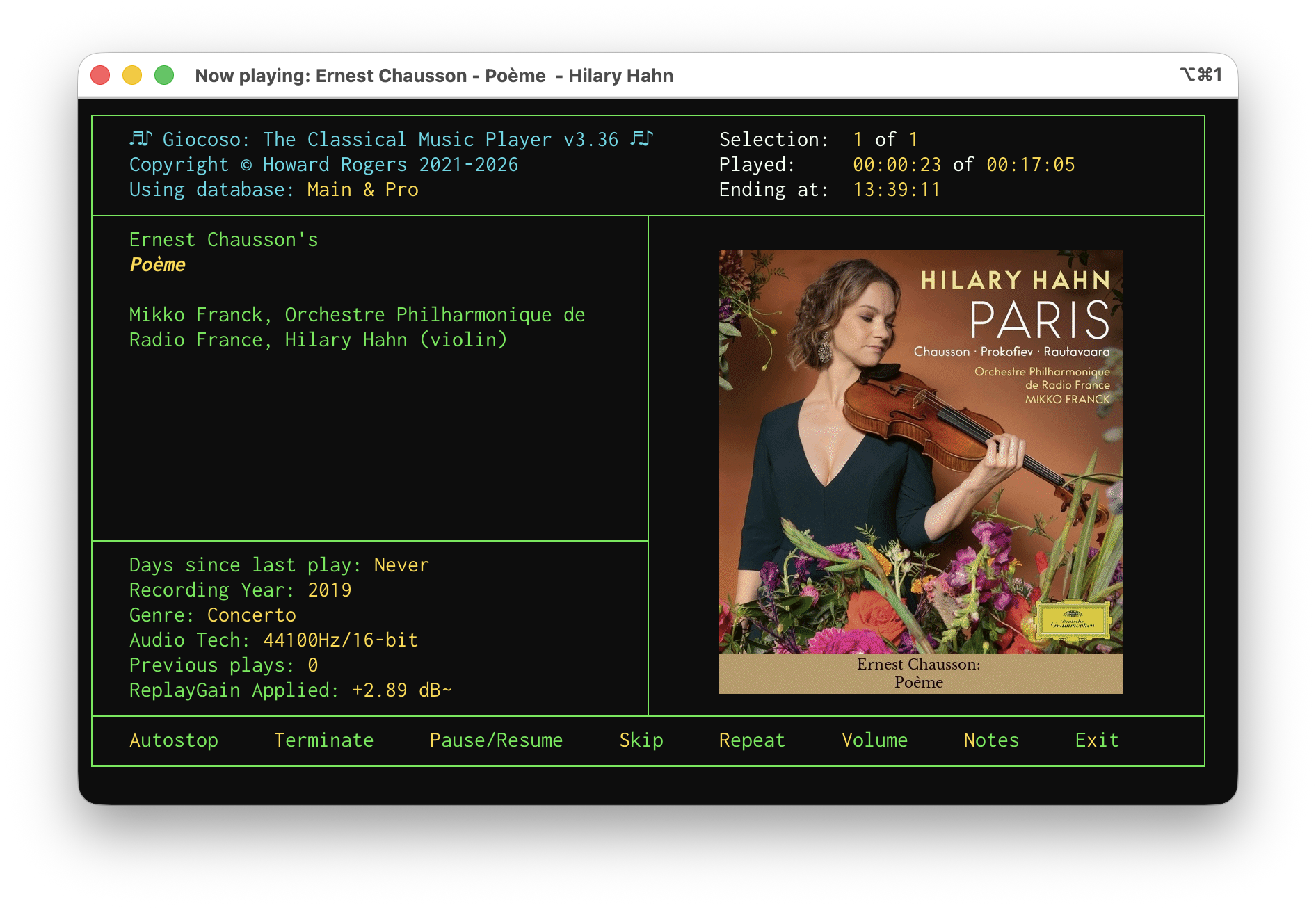
And zooming in again for clarity:

The cost of this fix? It's to make the uconv utility a dependency of Semplice on macOS (it's installed as a consequence of installing icu4c, which is done with a brew install icu4c). Semplice detects if you're running on macOS and, if so, takes your input for composer, composition, performer name as well as all other textual tags and passes them through the uconv utility to explicitly (and, this time, successfully) turn them into the composed, NFC version of Unicode that Linux recognises and prefers. If that utility is not present on your macOS then the conversion to composed Unicode doesn't happen and you may end up having to deal with captioned album art with weird spaces in it in future!
A new version of Semplice is imminent, but its release may have to be pushed back a little to ensure this latest cludge is working correctly! Watch this space, anyway. The new version will, of course, only affect fresh Semplice installations: if you're already using Semplice on macOS you'll need to install icu4c manually and, in addition, you'll need to make sure it gets into your PATH so that Semplice can find it when it needs to. Using Homebrew, the commands are:
brew install icu4c
sudo ln -s /opt/homebrew/opt/icu4c@78/bin/uconv /opt/homebrew/bin/uconv
If you're using Macports, the equivalent command is:
sudo port install icu
The “4c” part of the name is omitted and there's no need to link anything when using Macports, as the install ends up going into your existing PATH anyway.
It's annoying that there is such a low-level discrepancy in the way macOS and Linux handles such a fundamental issue. I wasn't aware of it earlier, simply because I hadn't done a lot of tagging work on macOS that involved characters with accents and the like… but the minute I started, the problems erupted, too! Hopefully fixed, anyway.
Giocoso Version 3.36 Released
 I have just released a new version of Giocoso: version 3.36. Full details are, as ever, in the relevant Changelog. Key takeaways, however, are:
- Better handling of PulseAudio from within the program, rather than relying on environment variables
- The introduction of minig: a way of launching a minimal Giocoso interface that can initiate playback or control existing playback from the sort of small, portrait-oriented terminal you'd likely get on a mobile phone (basically replacing mgiocoso, though that still exists for now, too)
- The usual array of bug fixes, including one that means Giocoso is not flummoxed by decimal separators that are not the usual '.'
- A new program logo that now works better with non-black terminal colour schemes:
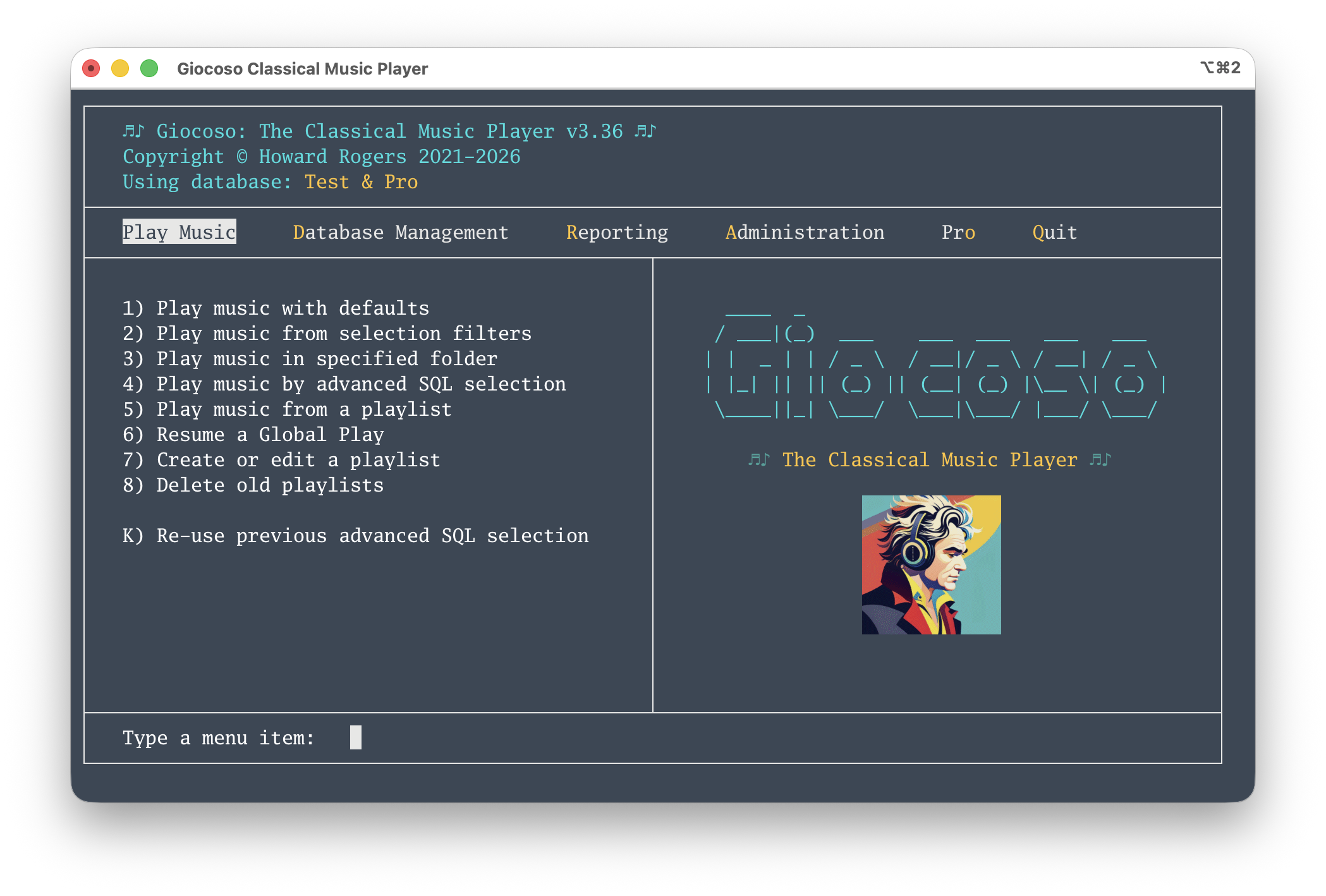
Updating is accomplished in the usual way: take the Administration menu, Option 1, supply the sudo password when prompted and sit back and let it happen. Quit Giocoso when the update completes, ignoring any error messages that might appear on the way out. Re-launch the program and enjoy!
The Problem of Portability (Part 2)
I wrote last time about a new feature in the about-to-be-released Version 3.36 of Giocoso: the ability to ssh into a machine that has Giocoso installed and then to initiate play of music (and subsequently to control it). This, essentially, gives us the following situation:
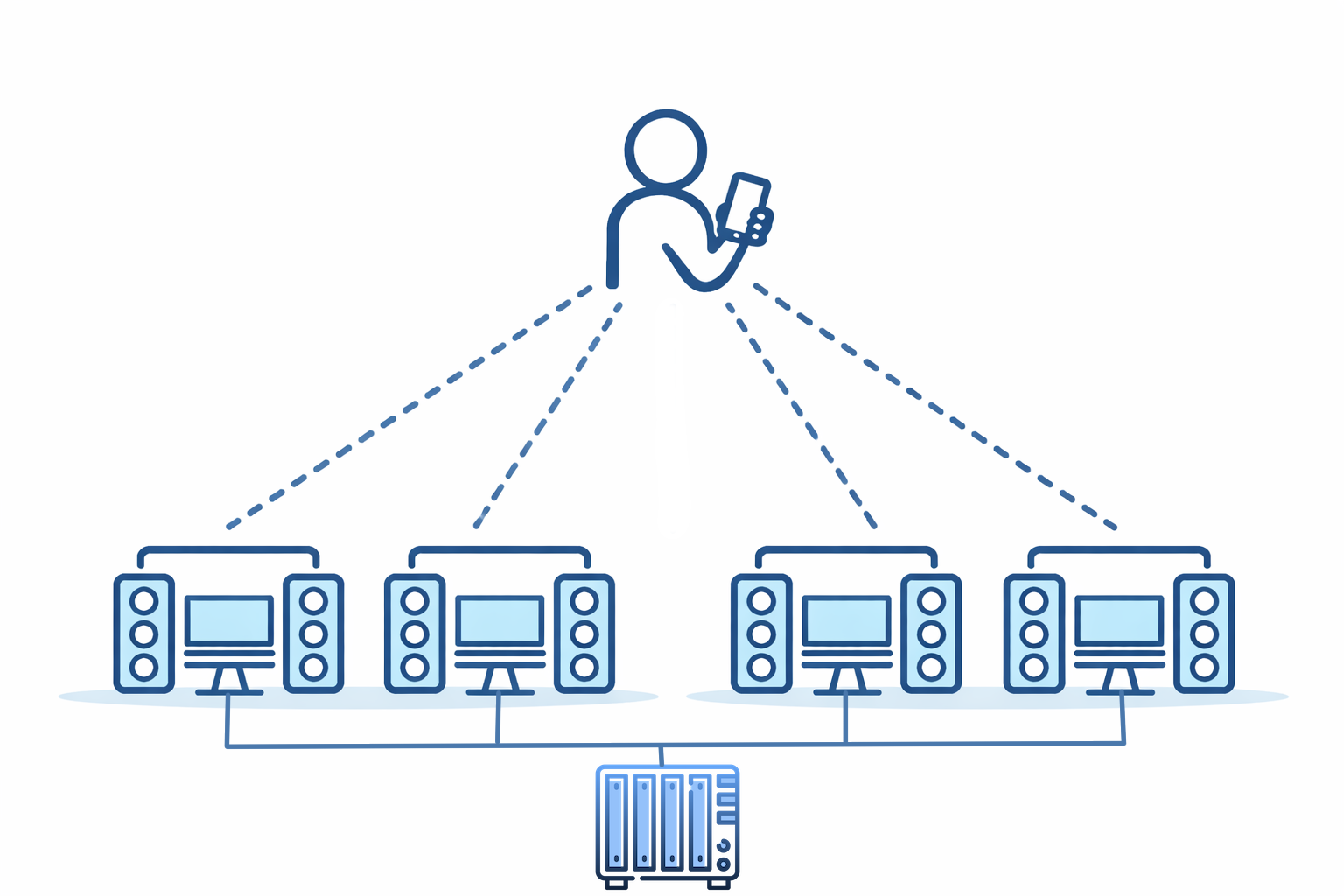
A person with a mobile device can ssh into multiple PCs, each running Giocoso and each with output available to speakers. Each of these 'playing PCs' is network-connected with NFS to the NAS box that contains my music collection: in this way, music can play in multiple rooms in the house. This is a first step to achieving “music portability” around the home: the ability to initiate music playback from an ssh connection is important to making this happen.
The drawback to this approach is one I’ve already hinted at: I have to ssh into each playing PC separately and each playing PC has to have enough compute resource to run Giocoso; each also has to have its own NFS connection to the music collection. Neither are particular intractable issues, but editing /etc/fstab to create a mounted NFS on multiple devices is a bit of a pain; and (especially of late) computers with screens, mouse, keyboard, RAM and decent CPU are not available at quite the bargain-basement prices they once were!
However, there is also the possibility of this sort of configuration:
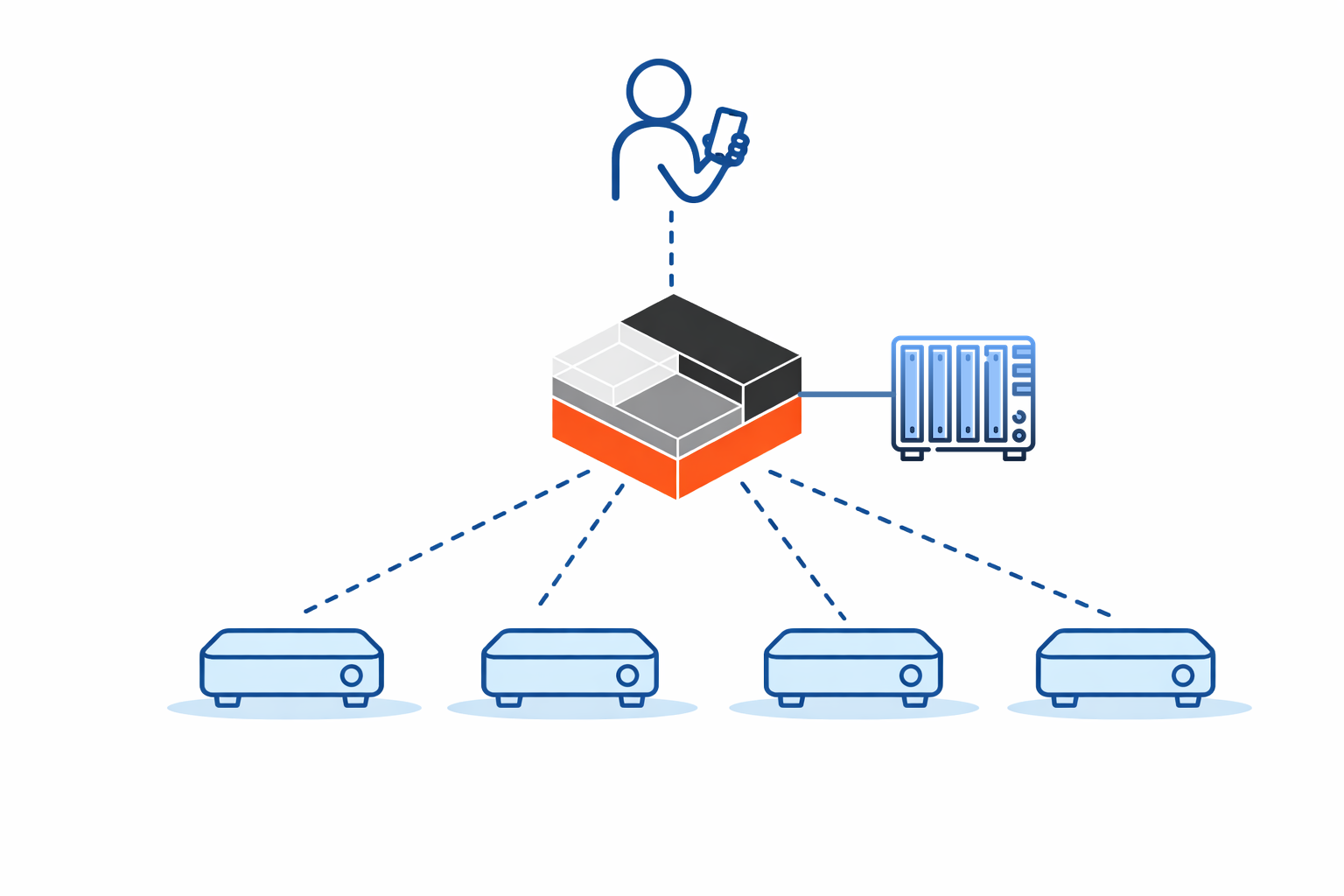
In this model, we have someone using a phone to control a single PC or computing device (and I’ll come back to the distinction between those two things in a moment!). It's the only computer connected to the NAS; it's the only one with sufficient compute resources to be able to run Giocoso. It is, in fact, the only PC running Giocoso! Somehow, however, this one 'playing PC' is pushing its audio output to four remote PCs over the network: these devices are mere ‘receivers’ of music, not players of it themselves. A subtle point being made in this diagram, too, is that the four ‘receiving’ devices are pretty minimal: they don’t have a screen, keyboard or mouse. They don’t need a powerful CPU (because they’re passive receivers of a music signal, not generators of it) and they don’t need much RAM (ditto). They do need speakers attached to them, obviously: they’re no use to anyone if they can’t make the audio signal they receive actually sound out in the air! My drawing skills didn’t extend to actually showing those necessary speakers, but they’re there nonetheless 
But this prompts the question: how can this configuration possibly work? How can a ‘music receiver’ that lacks the ability to itself run Giocoso nevertheless receive audio from that single PC controlled by mobile phone over ssh? From the opposite perspective, how can that one directly-controlled computing device push its audio data over the network?
The answer is PulseAudio. It does for audio what X11 does for graphics: separates the creator of something from the presenter of it. With X11, you have a program that wants to draw a form or document on a monitor running on one PC and a second PC that actually has a screen attached to it is able to render the depiction of that form. With PulseAudio, a similar division of labour can exist: the one PC connected to the NAS wants to generate audio and the four playing devices have audio hardware that can actually make that audio sound out into the physical world. The beauty of this is that the hardware needed to generate audio data only has to exist in one place; the playing devices can be very lightweight things because they're not actually doing the generating, just the 'sounding out' of a passively received audio signal. You could have an ancient computer running with 1GB RAM and an asthmatic CPU playing excellent quality music, provided only it's hooked up to a decent pair of speakers.
It is to facilitate this sort of 'distributed music playing' that the new feature in Giocoso Version 3.36 that I mentioned last time kicks in. As a reminder, the new feature is the Giocoso mini-player:
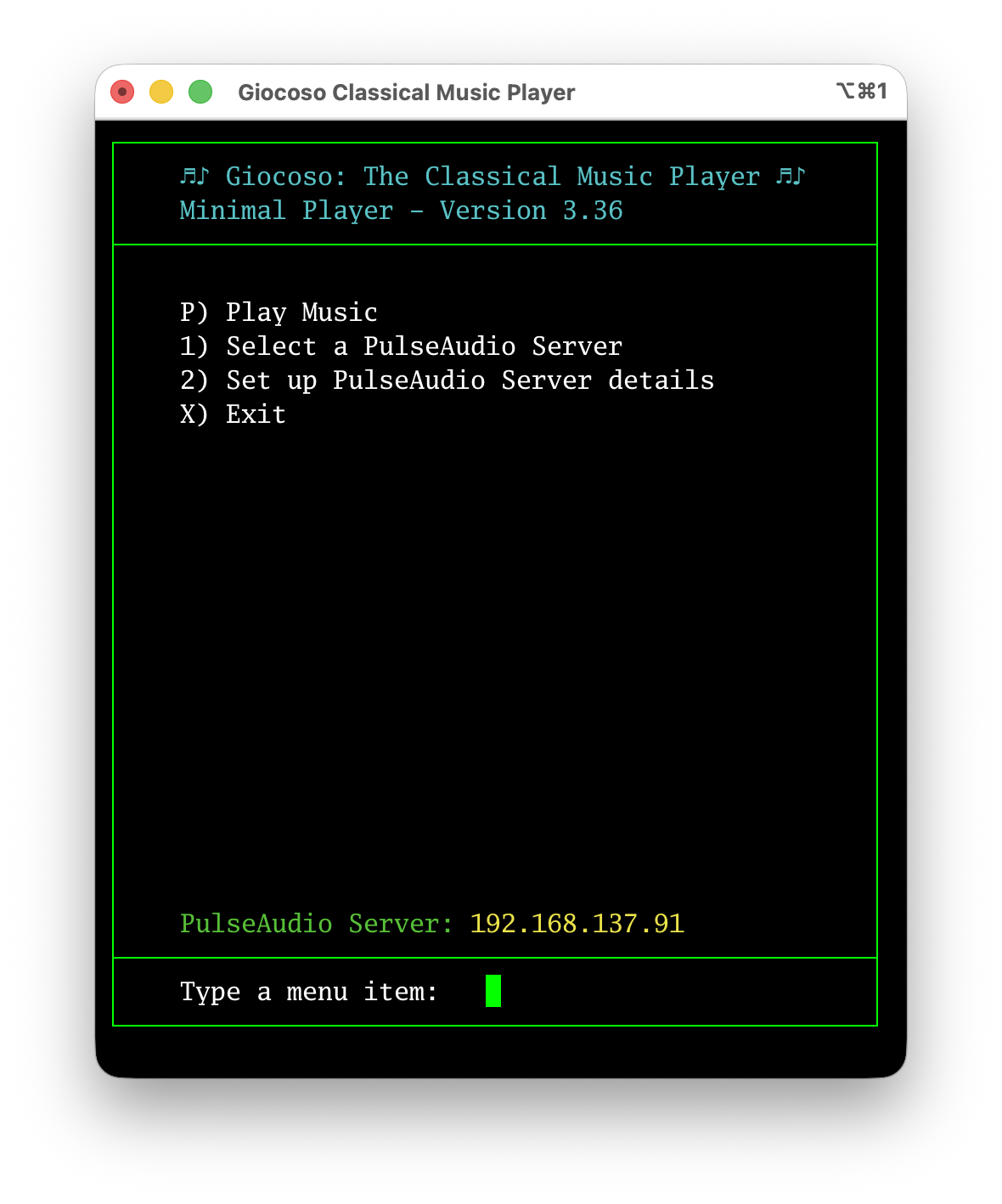
It runs on a computer that has full-blown Giocoso installed on it, but its program display is in portrait mode and limited in width, without graphics, so it runs perfectly on a mobile device that is merely connected to the Giocoso player PC via ssh.
The point this time, however, is to note the Option 1 and Option 2 menu items: these let you set up a number of PulseAudio ‘sinks’ and then select one or other of them as actively in use. Here’s what you see when you take Option 2, for example:
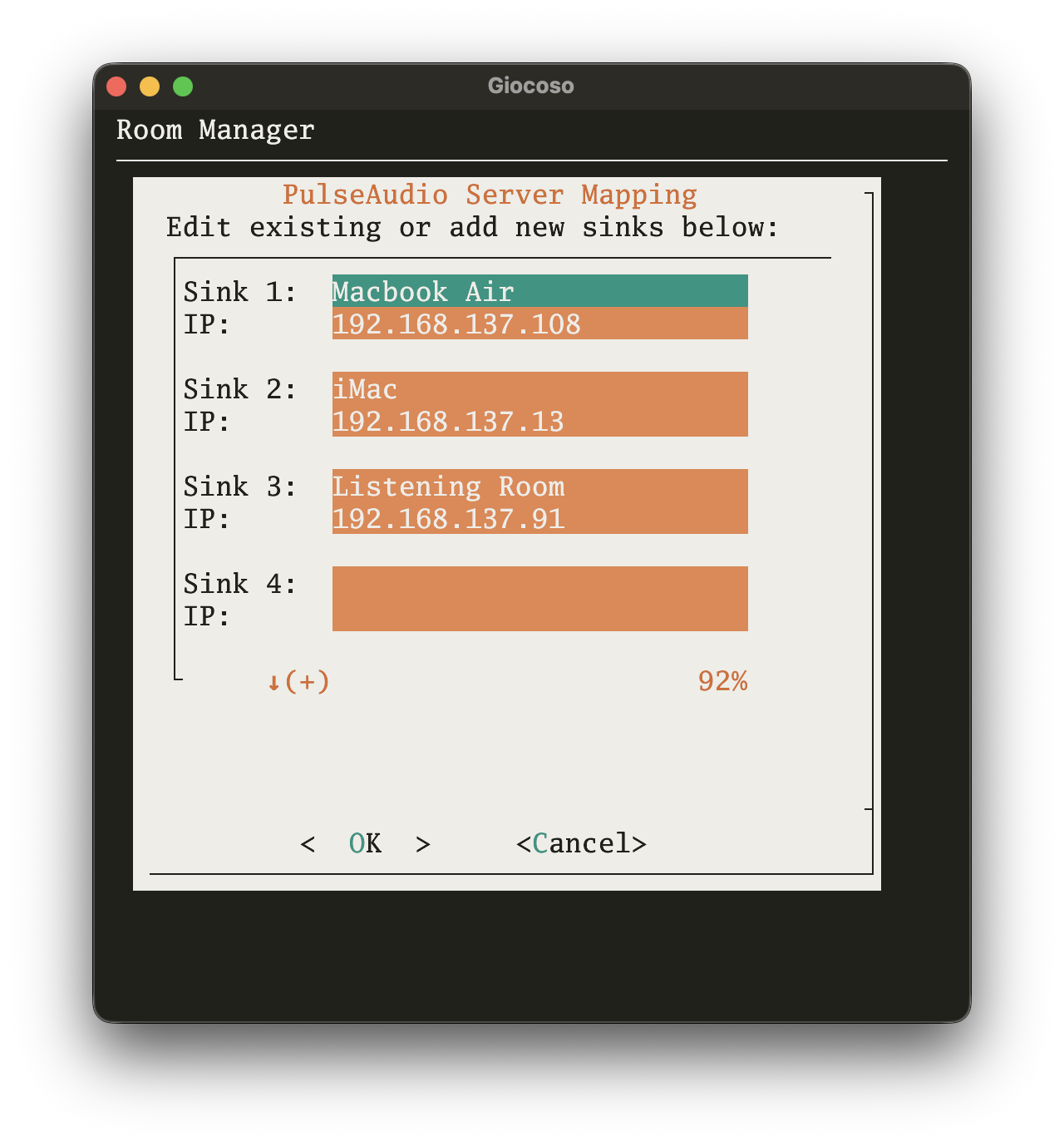
You’re allowed to create up to five ‘sinks’ on this screen: their labels are up to you, but must be less than 14 characters long (they’ll be truncated otherwise). Each label is then paired up to the IP address of the device to which the label applies. Those rather obviously need to be fixed IP addresses (or, at least, addresses with DHCP reservations) so that they don’t change after initial setup: Giocoso on the playing PC needs to be able to find it on the network so that the audio can be sent to the right place.
Once you’ve built a library of possible PulseAudio sinks in this way, you can take the mini-player’s Option 1 to select a particular one of them to send audio to:
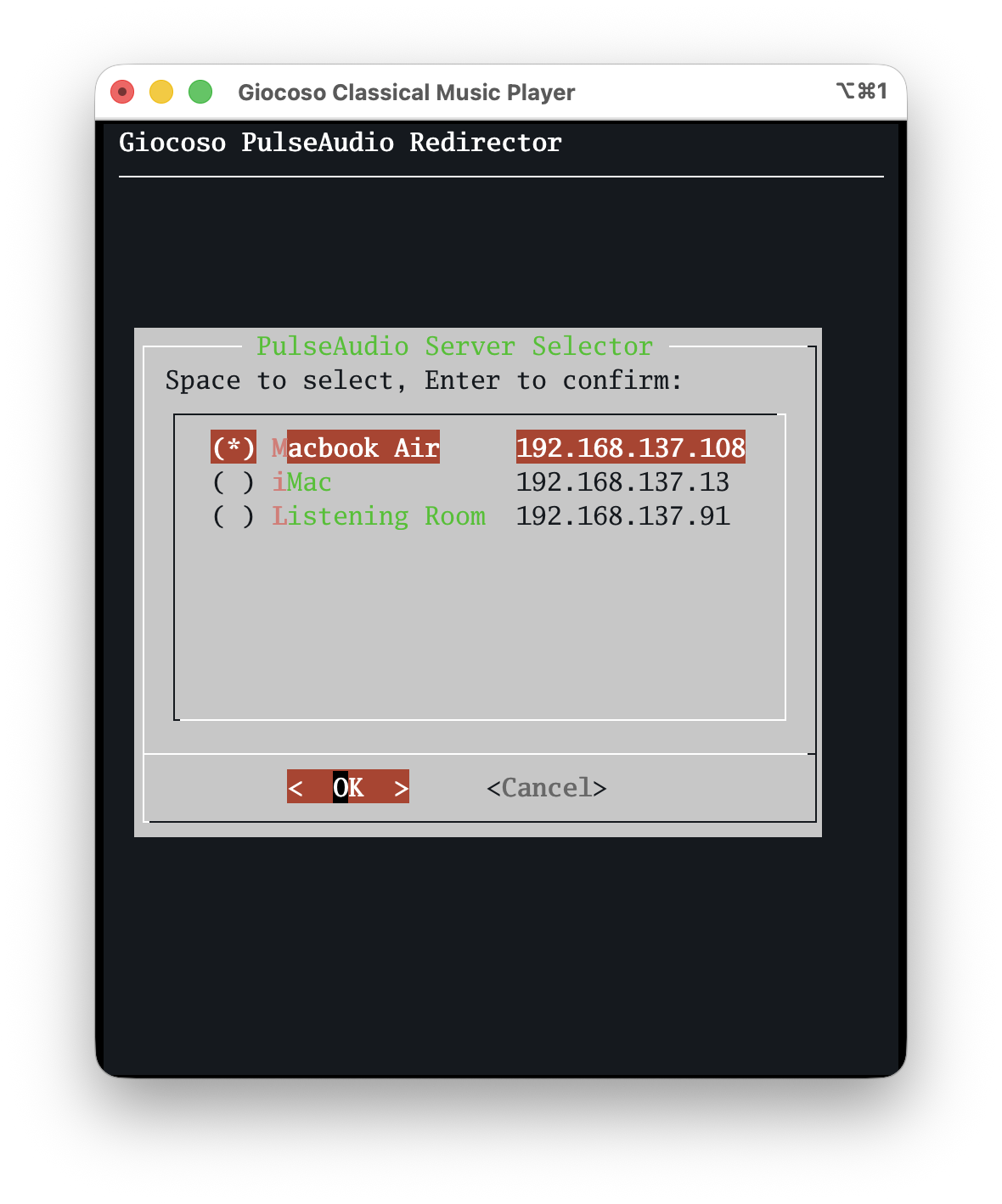
The current audio ‘sink’ is marked with an asterisk; your job is to up and down arrow through the list of available sinks and press the Space Bar when you’re sitting on the item you want to use for the next play: that press of the Space Bar will make the asterisk jump to that item, indicating selection success. Press [Enter] to make the new selection ‘stick’. You’ll be returned to the main mini-player menu where, towards the bottom of the screen, you’ll see confirmation of the currently-selected PulseAudio server: if you then tap the ‘P’ option to play music, it’s this IP address to which music will be directed.
To be clear, for any of this to work, the persistent configuration parameter Force the use of PulseAudio must be set in full-fat Giocoso’s configuration settings:
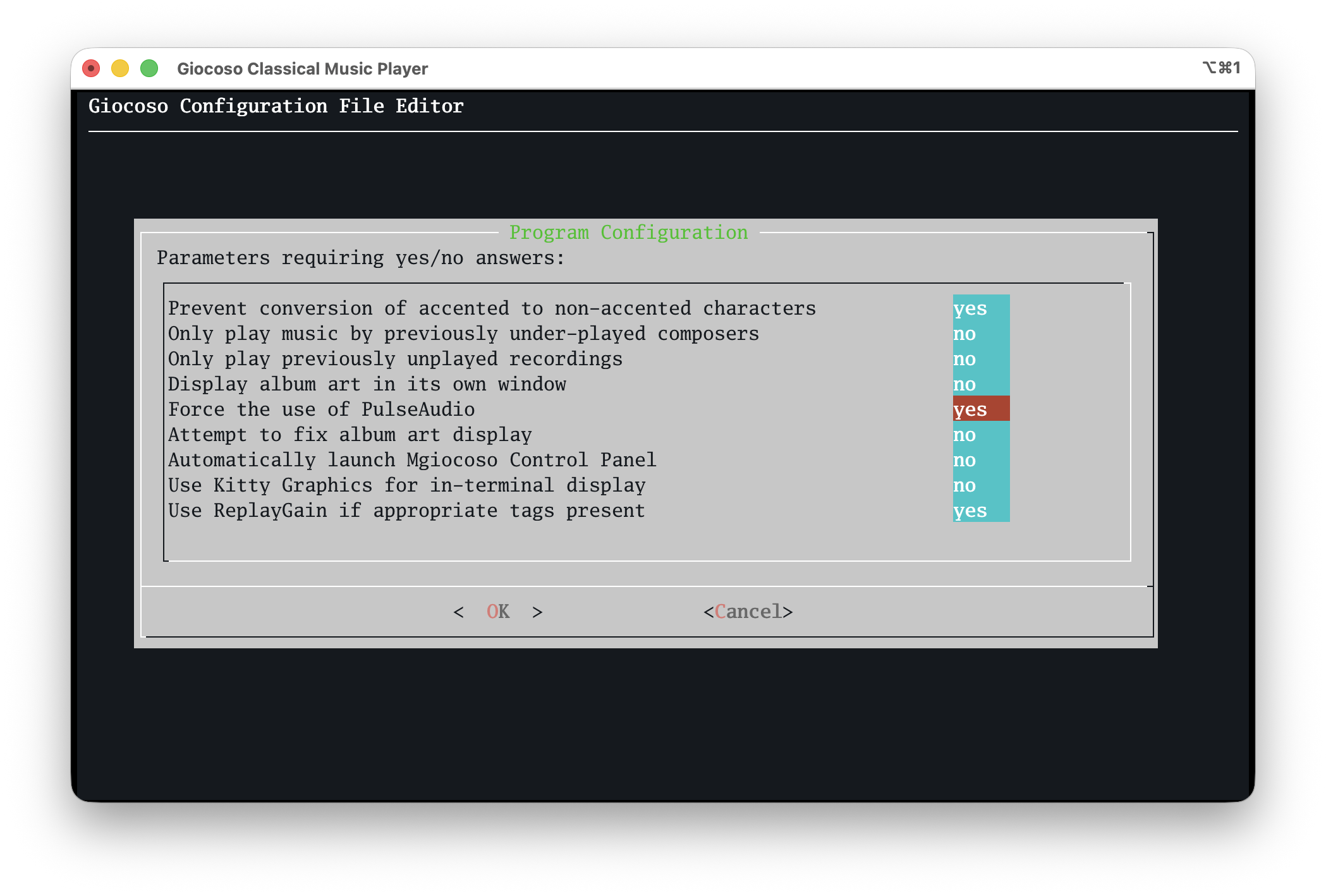
If you haven’t set that parameter to “yes”, then specifying a PulseAudio server to play to simply doesn’t work: audio will ‘sound’ on the PC you’re directly connected to, assuming it has speakers to use! It should also be obvious, I hope, that this can only work if your player PC and the devices it sends audio to are all configured to use PulseAudio (or its cousin, PipeWire, which is essentially the same thing as far as these purposes are concerned). Most Linux distros ship with PulseAudio out-of-the-box and very little, if any, configuration is needed to make them players or sounders. MacOS can also act as a PulseAudio client and server, though things get much more complicated there: I’ll have specific documentation prepared for this topic shortly.
The little secret ingredient I haven’t mentioned until now, too, is that the box doing the Giocoso playing and sending its audio out to ‘sounding devices’ doesn’t have to be a big PC. There’s a reason it was drawn in that earlier diagram with this logo:

That is the official logo of the LXC or Linux Containers project. What is an LXC container? Well, it’s sort-of like a virtual machine, running on a Proxmox hypervisor, but incredibly minimal and lightweight: I have an Arch one configured to use just 2GB of RAM, 8GB of hard disk space and two virtual CPUs. It runs nothing much more than standard Giocoso, configured to use PulseAudio. I ssh into it and, using the mini-player interface, direct it’s audio output to whichever one of my minimalist room setups I need to hear music from at the time.
It is quite complicated to get an LXC container to connect to my music NAS; it is even more complicated to get an LXC container to ‘see’ the physical music playing hardware that the Proxmox host has. Documentation on getting all that working is in preparation, too.
I hasten to add that none of this affects how you use Giocoso if you don’t want it to! All my ‘serious’ music listening happens in my dedicated ‘listening room’: that contains a passively-cooled PC hidden away in a draw, physically connected via optical-out to a full-on DAC and amplifier. I ssh direct into that machine and run full-fat Giocoso on it from my iMac desktop: there’s no PulseAudio involved at all there… and I wouldn’t want it to be!
The new features in version 3.36 of Giocoso simply means that it’s now easier than ever to have less-serious listening follow me about the house, if I want it to: I ssh into the LXC container and direct its output via PulseAudio to the lightweight playing device in whatever room I’m working in at the time. In my garden shed, the playing device is literally a Raspberry Pi 3B playing wirelessly to a small Bluetooth speaker: I’m not expecting great hi-fi fidelity from that setup and sending audio via PulseAudio and Bluetooth therefore doesn’t degrade anything below my already-low expectations! It is enough, however, to have music follow me around the house at will… or, at least, at the touch of some keys on my mobile phone